Samsung Galaxy Wearable
| Technical Specification |
Download |
| Latest Updated |
May 28, 2024 |
|
| Latest Version |
2.2.58.24021661 |
| Developer |
|
| Operating system |
Android, iOS |
| Language |
English |
| Price |
Free |
| Available version |
2.2.58.24021661 |
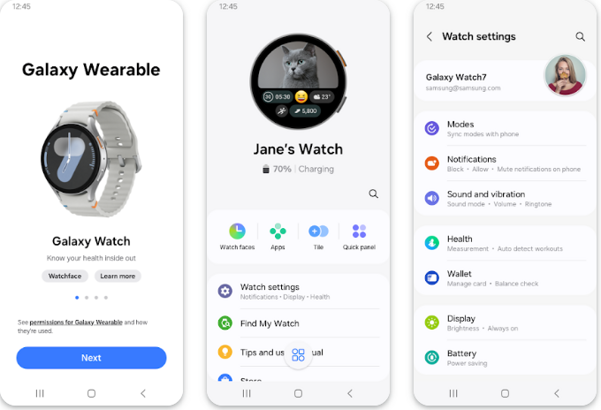
Samsung Galaxy Wearable is a comprehensive application designed to enhance the functionality of your Samsung wearable devices, providing users with a seamless connection to their smartphones. With its intuitive interface, it enables easy management of apps, notifications, and fitness tracking features. Users can customize watch faces, monitor health metrics, and access music controls, all in one centralized platform. By facilitating effortless synchronization and offering personalized insights, Samsung Galaxy Wearable empowers users to stay connected, healthy, and efficient in their daily activities. Experience a smarter lifestyle with enhanced convenience and control right on your wrist.
More Details
Below are some of the notable features of the Samsung Galaxy Wearable app:
- Comprehensive Health Monitoring: The app integrates seamlessly with a variety of health sensors to provide real-time biometric data tracking, including heart rate, stress levels, and sleep patterns. Utilizing advanced algorithms, the app analyzes your data to deliver personalized insights and recommendations, empowering users to make informed decisions about their wellness.
- Customizable Notifications: Users can tailor their notification settings to receive alerts from essential applications directly on their wearable device. This feature fosters improved productivity by allowing users to manage calls, messages, and reminders without the need to check their smartphone, ensuring they stay connected while on the go.
- Activity Tracking and Insights: The app offers extensive support for tracking various physical activities, from walking and running to swimming and cycling. With the incorporation of GPS functionality, users can view detailed maps of their routes, while the smart coaching feature provides real-time feedback and suggests improvements to enhance performance and achieve fitness goals.
- Device and App Integration: The Samsung Galaxy Wearable app supports a wide array of third-party applications, enabling users to enrich their wearable experience. Whether it’s for accessing music streaming services or controlling smart home devices, this feature enhances the versatility of the device and contributes to a more connected lifestyle.
Extra Details
How to uninstall the Samsung Galaxy Wearable? You can uninstall Samsung Galaxy Wearable on your mobile device by following these steps: Locate setting icon on your phone. Tap Application manager or Apps Touch Samsung Galaxy Wearable. Press uninstall.
How to install the application
How to download and install Samsung Galaxy Wearable on your mobile device? The steps below explain how you can download the app on Google Play:
- Launch Google Play on your Android device
- Input Samsung Galaxy Wearable in the search bar
- Touch the most relevant search result
- Tap Install to download the app
- Wait for the process to complete.
DISCLAIMER
- The above app is a mobile app that will not change any system settings on your phone
- All apk files downloaded from our site are secure
- We provide the official download link from Google Play Store
- The trademarks and logos of all the merchants displayed on the website are the property of their respective owners. The website is not affiliated or associated with any of them
- Our website and its content strictly comply with all the terms and conditions of Google Ads Advertising policies and Google Unwanted Software policy
Steps to Uninstall android App
How to uninstall the Samsung Galaxy Wearable? You can uninstall Samsung Galaxy Wearable on your mobile device by following these steps:
- Locate setting icon on your phone.
- Tap Application manager or Apps Touch Samsung Galaxy Wearable.
- Press uninstall.
Tips & Tricks
More about the Samsung Galaxy Wearable app
- Utilize the advanced health monitoring features to track your fitness goals effectively. By regularly checking your heart rate and sleep patterns, you can gain insights into your overall wellness and adjust your routines to optimize your health.
- Take advantage of customizable watch faces to reflect your personal style or to display critical information at a glance. This feature allows you to tailor your smartwatch experience, making it not only functional but also a reflection of your individuality.
- Sync your smartphone notifications with your watch to stay connected without distractions. By managing alerts directly from your wrist, you can prioritize important messages and calls, reducing the need to constantly check your phone.
- Explore the variety of workout modes available in the app to enhance your training sessions. By selecting specific activities, you can receive tailored metrics and feedback, improving your performance and ensuring you stay motivated throughout your fitness journey.
- Leverage the seamless integration with other Samsung devices to create a cohesive ecosystem. By connecting your wearables, smartphones, and smart home devices, you can simplify your daily tasks and enhance your productivity, making your tech work for you.