MPLS Parking
| Technical Specification |
Download |
| Latest Updated |
May 28, 2024 |
|
| Latest Version |
10.5 |
| Developer |
|
| Operating system |
Android, iOS |
| Language |
English |
| Price |
Free |
| Available version |
10.5 |
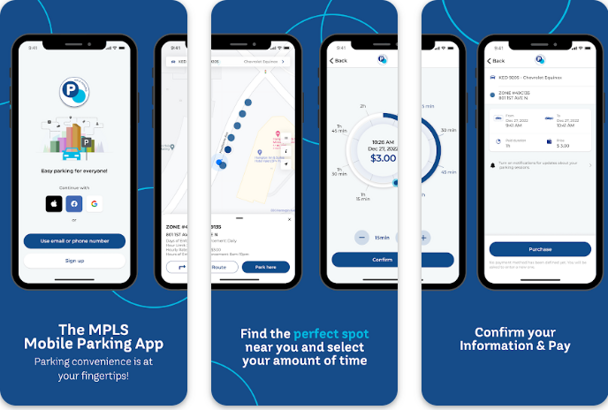
MPLS Parking is an innovative mobile application designed to streamline parking management in urban areas. With a user-friendly interface, it allows users to easily locate available parking spots in real time, reserve spaces in advance, and pay seamlessly through their smartphones. The app not only reduces the hassle of searching for parking but also provides detailed information on rates and any ongoing promotions. By optimizing parking efficiency, MPLS Parking enhances the overall urban experience, saving time and reducing the stress often associated with finding parking in busy cities.
More Details
Below are some of the notable features of the MPLS Parking app:
- Real-Time Availability Tracking: The app utilizes advanced geolocation technology to provide live updates on parking space availability across Minneapolis. Users can easily locate the nearest parking options, ensuring they can make informed decisions quickly and efficiently. This feature significantly reduces the time spent searching for parking, thereby enhancing the overall user experience.
- Dynamic Pricing Model: MPLS Parking employs an intelligent dynamic pricing algorithm that adjusts rates based on demand and time of day. Users receive insights into the cost fluctuations of parking spaces in real-time, allowing them to select options that best fit their budget. This not only promotes cost-effective parking but also helps manage occupancy levels in high-demand areas.
- Integrated Payment System: The app offers a seamless payment interface that accepts multiple payment methods, including credit/debit cards and mobile wallets. Users can complete transactions directly within the app, receive instant receipts, and manage their parking expenses effortlessly. This feature enhances user convenience and ensures secure transactions.
- Reservation and Booking Management: Users can pre-book parking spots and receive reminders about their reservations. The app allows for modifications and cancellations within a designated time frame, streamlining the parking process for individuals and minimizing the risk of no-shows. This functionality is particularly beneficial for users attending events or meetings, as it guarantees a reserved spot in advance.
Extra Details
How to uninstall the MPLS Parking? You can uninstall MPLS Parking on your mobile device by following these steps: Locate setting icon on your phone. Tap Application manager or Apps Touch MPLS Parking. Press uninstall.
How to install the application
How to download and install MPLS Parking on your mobile device? The steps below explain how you can download the app on Google Play:
- Launch Google Play on your Android device
- Input MPLS Parking in the search bar
- Touch the most relevant search result
- Tap Install to download the app
- Wait for the process to complete.
DISCLAIMER
- The above app is a mobile app that will not change any system settings on your phone
- All apk files downloaded from our site are secure
- We provide the official download link from Google Play Store
- The trademarks and logos of all the merchants displayed on the website are the property of their respective owners. The website is not affiliated or associated with any of them
- Our website and its content strictly comply with all the terms and conditions of Google Ads Advertising policies and Google Unwanted Software policy
Steps to Uninstall android App
How to uninstall the MPLS Parking? You can uninstall MPLS Parking on your mobile device by following these steps:
- Locate setting icon on your phone.
- Tap Application manager or Apps Touch MPLS Parking.
- Press uninstall.
Tips & Tricks
More about the MPLS Parking app
- Utilize the real-time availability feature to quickly locate nearby parking spots. This function not only saves you time but also reduces the frustration of circling around in search of parking. Simply open the app to view live updates on available spaces.
- Take advantage of the advanced reservation option to secure your parking in advance. By planning ahead, you can ensure a guaranteed spot upon arrival, allowing you to focus on your primary activities rather than parking concerns.
- Use the route optimization tool to find the quickest path to your selected parking location. This feature minimizes travel time and helps you avoid congested areas, enhancing your overall parking experience and allowing for smoother transitions to your destination.
- Leverage the notification system to receive alerts about available discounts and promotions. Staying informed about offers can lead to significant savings on your parking expenses, making your experience more economical.
- Explore the detailed analytics feature to gain insights into your parking habits. Understanding your usage patterns can help you make informed decisions about when and where to park, ultimately enhancing the cost-effectiveness and convenience of your parking experience.