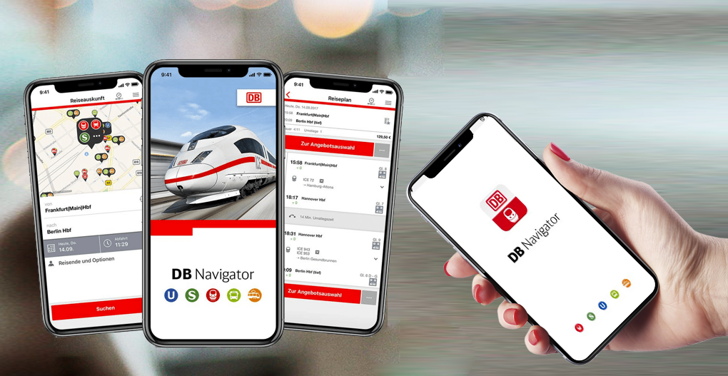
DB Navigator
| Technical Specification |
Download |
| Latest Updated |
May 28, 2024 |
|
| Latest Version |
24.18.0 |
| Developer |
Deutsche Bahn |
| Operating system |
Android, iOS |
| Language |
English |
| Price |
Free |
| Available version |
24.18.0 |
| Version history |
24.14.0 23.04.p02.02 22.12.p00.00 22.10.p03.00 22.08.p03.00 |
DB Navigator is a comprehensive mobile application designed to enhance the travel experience of users in Germany's extensive public transport network. This user-friendly tool allows travelers to effortlessly plan their journeys, access real-time departure information, and purchase tickets directly from their smartphones. With features such as interactive maps and itineraries, DB Navigator simplifies navigation through urban and regional transportation options. Users benefit from timely updates and route alterations, ensuring seamless travel and making public transport more accessible and efficient for everyday commuters and tourists alike.
More Details
Below are some of the notable features of the DB Navigator app:
- Real-Time Train Tracking: The app offers real-time tracking of trains across the network, allowing users to view the current location and estimated arrival times. This feature utilizes advanced GPS integration and live data feeds from the transportation network, ensuring that users receive the most accurate information possible regarding delays or changes in their commuting schedules.
- Intuitive Route Planning: DB Navigator provides a sophisticated route planning tool that enables users to generate optimal travel itineraries for their journeys. By incorporating multiple modes of transport, including trains, buses, and trams, the app utilizes algorithms that consider factors such as travel time, connections, and user preferences for transfers, thereby facilitating seamless travel experiences.
- Mobile Ticketing: The application integrates a mobile ticketing system that allows users to purchase and store tickets directly on their devices. This feature enhances convenience and security, eliminating the need for physical tickets. The app supports various payment options and provides users with the ability to access a digital ticket, complete with QR codes for easy validation at stations.
- Personalized Notifications: Users can customize the notification settings within the app to receive alerts regarding their specific commutes. This includes updates on train schedules, platform changes, and service disruptions. By employing push notifications and machine learning algorithms, the app learns user preferences over time, delivering relevant updates that enhance the overall travel experience.
Extra Details
How to uninstall the DB Navigator? You can uninstall DB Navigator on your mobile device by following these steps: Locate setting icon on your phone. Tap Application manager or Apps Touch DB Navigator. Press uninstall.
How to install the application
How to download and install DB Navigator on your mobile device? The steps below explain how you can download the app on Google Play: - Launch Google Play on your Android device
- Input DB Navigator in the search bar
- Touch the most relevant search result
- Tap Install to download the app
- Wait for the process to complete.
DISCLAIMER
- The above app is a mobile app that will not change any system settings on your phone
- All apk files downloaded from our site are secure
- We provide the official download link from Google Play Store
- The trademarks and logos of all the merchants displayed on the website are the property of their respective owners. The website is not affiliated or associated with any of them
- Our website and its content strictly comply with all the terms and conditions of Google Ads Advertising policies and Google Unwanted Software policy
Steps to Uninstall android App
How to uninstall the DB Navigator? You can uninstall DB Navigator on your mobile device by following these steps: - Locate setting icon on your phone.
- Tap Application manager or Apps Touch DB Navigator.
- Press uninstall.
Tips & Tricks
More about the DB Navigator app
- Leverage real-time train tracking to always stay informed about delays and changes. By enabling notifications within the app, you can receive instant updates about your train's status, making it easier to adjust your plans and avoid unnecessary waiting.
- Utilize the journey planner feature to optimize your travel routes. Input your starting point and destination, and the app will provide various options based on your preferences, such as the fastest route, fewer transfers, or affordable fares, ensuring a seamless travel experience.
- Take advantage of personalized travel profiles to streamline future bookings. By saving your frequent routes and preferred settings, you can quickly access tailored travel suggestions and streamline the ticket purchasing process, ultimately saving valuable time.
- Explore the offline map functionality to navigate stations without an internet connection. Download relevant route maps ahead of time to ensure you can always find your way around, making travel stress-free, especially in areas with poor network coverage.
- Connect with other travelers through the community feature to share tips or seek advice. Engaging with fellow users can enhance your travel experience by providing recommendations on local attractions, dining options, and travel hacks specific to your route.