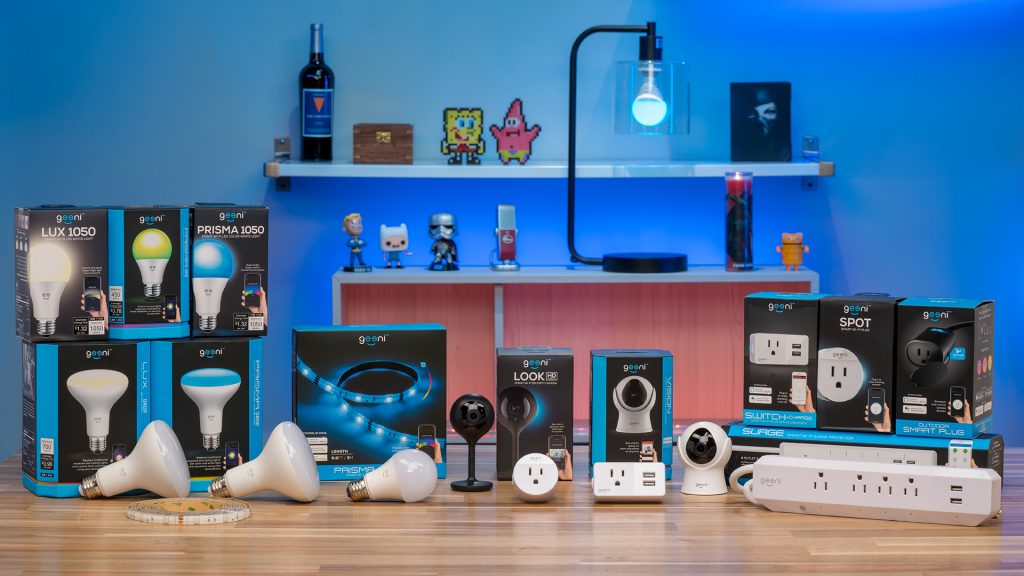
Geeni
| Technical Specification |
Download |
| Latest Updated |
Oct 28, 2024 |
|
| Latest Version |
4.0.1 |
| Developer |
Merkury Innovations |
| Operating system |
Android, iOS |
| Language |
English |
| Price |
Free |
| Available version |
4.0.1 |
| Version history |
3.0.1 2.2.3 2.2.2 2.2.1 2.1.2 |
Geeni is a versatile smart home application designed to simplify your daily life through seamless control of compatible devices. With Geeni, users can effortlessly manage lighting, security cameras, and home appliances from a single interface. The app offers real-time monitoring and scheduling options, ensuring enhanced convenience and energy efficiency. Its user-friendly design promotes easy navigation and setup, making it ideal for both tech-savvy individuals and beginners. Experience enhanced comfort, security, and peace of mind with Geeni, your ultimate smart home companion.
More Details
Below are some of the notable features of the Geeni app:
- Unified Smart Home Control: Geeni provides a seamless interface for managing a variety of smart devices across your home. With compatibility for numerous brands, the app serves as a centralized hub, allowing you to control lighting, cameras, plugs, and more, all from a single interface. This eliminates the hassle of switching between multiple applications, streamlining user experience and enhancing operational efficiency.
- Real-Time Notifications and Alerts: Users can configure the app to receive real-time notifications about device status changes and alerts for unusual activity. This feature utilizes advanced push notification technology to keep homeowners informed on their devices’ performance, whether it be identifying potential security breaches through motion detection or monitoring energy consumption trends.
- Energy Management Insights: Geeni incorporates an energy monitoring feature that provides valuable analytics related to your smart appliances' power usage. By leveraging data visualization techniques, users can track their consumption patterns over time, identify energy-hungry devices, and receive actionable recommendations to enhance energy efficiency, ultimately supporting sustainability goals.
- Voice Assistant Integration: The app supports seamless integration with leading voice assistants such as Amazon Alexa and Google Assistant. This functionality allows users to execute commands hands-free, facilitating a more efficient and modern smart home experience. Utilizing voice recognition technology, users can control devices by simply speaking, thereby enhancing accessibility and convenience for all household members.
Extra Details
How to uninstall the Geeni? You can uninstall Geeni on your mobile device by following these steps: Locate setting icon on your phone. Tap Application manager or Apps Touch Geeni. Press uninstall.
How to install the application
How to download and install Geeni on your mobile device? The steps below explain how you can download the app on Google Play:
- Launch Google Play on your Android device
- Input Geeni in the search bar
- Touch the most relevant search result
- Tap Install to download the app
- Wait for the process to complete.
DISCLAIMER
- The above app is a mobile app that will not change any system settings on your phone
- All apk files downloaded from our site are secure
- We provide the official download link from Google Play Store
- The trademarks and logos of all the merchants displayed on the website are the property of their respective owners. The website is not affiliated or associated with any of them
- Our website and its content strictly comply with all the terms and conditions of Google Ads Advertising policies and Google Unwanted Software policy
Steps to Uninstall android App
How to uninstall the Geeni? You can uninstall Geeni on your mobile device by following these steps:
- Locate setting icon on your phone.
- Tap Application manager or Apps Touch Geeni.
- Press uninstall.
Tips & Tricks
More about the Geeni app
- Utilize the scheduling feature to automate your smart devices' daily routines. By setting specific times for lights to turn on or devices to power down, you can save energy and enhance security while enjoying a more organized lifestyle.
- Explore the scene creation tool to combine multiple devices into a single command, tailored to your mood or specific activities. Crafting personalized scenes can significantly elevate your home ambiance during gatherings or relaxation time.
- Take advantage of the voice control integration with popular virtual assistants. This hands-free capability allows you to manage your devices seamlessly, adding convenience to your daily tasks while ensuring you remain connected and in control of your smart home.
- Monitor your energy usage through the app's analytics dashboard. This feature provides insights into your consumption patterns, enabling you to identify opportunities for improvement and make informed decisions that can lead to cost savings.
- Leverage the device sharing option to securely allow family or friends access to your smart home. Granting temporary control ensures that trusted individuals can assist with managing devices without compromising your security settings.